The HubSpot card
The FlowState card, FlowState APN Sync, sits on each deal in HubSpot. It is where sellers prepare a deal for AWS, submit it, and follow what AWS does with it — without leaving HubSpot. A HubSpot admin adds the card to the deal view once; see Show the FlowState card on deals.
What the card shows
Open a deal and select the FlowState tab. From top to bottom, the card shows:
- The line This deal is managed by FlowState.
- The status line: where the deal stands with AWS (see the table below).
- One row for each area of work, with its current state and an Open button. Open opens a side panel on that area’s tab.
- The links Open FlowState and AWS Partner Central.
| Row and tab | What the seller does there |
|---|---|
| Prepare the Deal for APN | Fills in the AWS deal fields that AWS needs, then clicks Save fields. Required fields are marked, and a banner lists what is still missing. Industry is always shown: FlowState fills it in from the deal, the associated company or an AI suggestion, and the seller can change it. |
| Business problem | Picks a template, clicks Use this template and lets FlowState draft the business problem from the deal. A score shows how complete the draft is. The seller can answer open questions and click Regenerate with these answers, then Save & submit or Discard. |
| Readiness | Shows what AWS still needs before it accepts the opportunity, and has the Submit to AWS button. |
| Next steps | Keeps Our next step for the deal, shows AWS’s next step, and lists earlier steps under History (see below). |
| Stakeholders | Lists the people AWS has put on the opportunity. The list stays empty until AWS staffs it. |
| Marketplace | Creates and manages AWS Marketplace private offers for the deal. Shown only when the AWS Marketplace connector feature is on. |
Each deal gets 5 business-problem drafts free; the card warns before a draft that is billed (see Pricing).
When the deal reaches AWS
Turning on APN Sync with AWS enabled on a deal does not send anything to AWS on its own. FlowState creates the AWS opportunity only when a submission is requested:
- a seller clicks Submit to AWS on the Readiness tab,
- a seller clicks Save & submit on the Business problem tab, or
- your default template has Auto-submit when ready on, and the deal becomes complete.
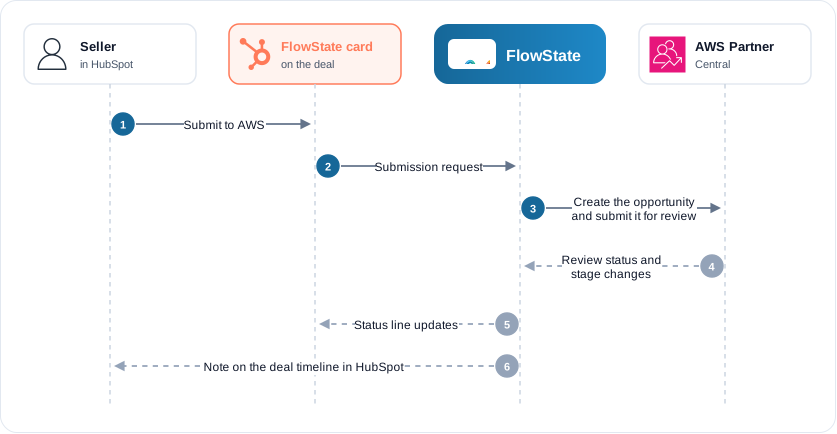
After the first submission, later changes to the deal in HubSpot reach AWS automatically. For the full rules, see APN overview.
The status line
| Status line | Meaning |
|---|---|
| Not yet sent to AWS | No AWS opportunity exists for this deal. |
| Linked to AWS — not yet submitted for review | The deal is linked to an AWS opportunity, but that opportunity has not been submitted for AWS review. |
| Submitted — waiting for AWS review | FlowState submitted the opportunity. AWS has not started its review. |
| Under AWS review | AWS is reviewing the opportunity. The AWS deal fields are locked. |
| AWS needs changes | AWS asks for changes. Read What AWS says on the Business problem tab. |
| Approved by AWS | AWS accepted the opportunity. The AWS stage follows after the dot, for example Approved by AWS · Qualified. |
| Rejected by AWS | AWS rejected the opportunity. |
Next steps and History
- On the Next steps tab, type the step in Our next step and click Save next step.
- The saved step moves to the top of History. Next to it, a spinner shows Saving to AWS… until AWS has it. Then it shows Sent to AWS with the time.
Other states you can see next to the step:
| State | Meaning |
|---|---|
| Held until AWS review clears | AWS does not accept next-step changes during its review. The step is saved and goes to AWS when the review ends. |
| Goes to AWS when the opportunity is created | The deal has no AWS opportunity yet. |
| Not sent to AWS | The update failed. The reason is shown next to it. |
A step that has not changed for a long time shows This next step hasn’t moved in a while.
When HubSpot is disconnected
If an admin disconnects HubSpot in FlowState, APN sync pauses for the whole tenant, because every sync reads from or writes to HubSpot. Settings → Integrations then shows paused — HubSpot disconnected. When HubSpot is connected again, APN sync resumes. See Disconnecting HubSpot.