APN sync overview
APN sync links a HubSpot deal to a co-sell opportunity in AWS Partner Central. This page explains what FlowState sends to AWS, when it sends it, and what comes back to the deal.
To set it up, see Prerequisites and Getting started.
How the sync works
From HubSpot to AWS
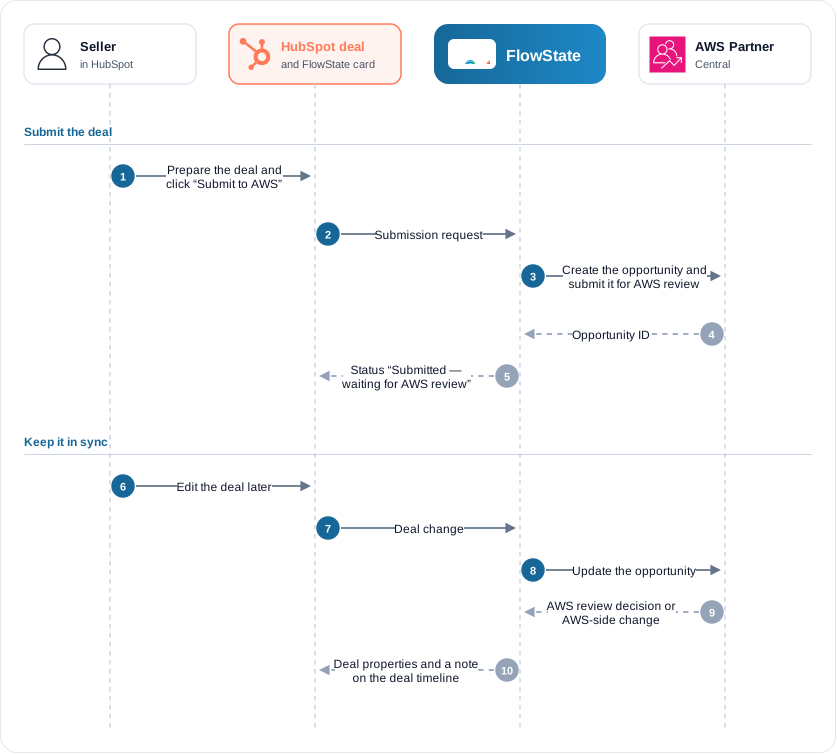
FlowState creates an opportunity in Partner Central only when a submission is requested for the deal. One of these requests it:
- A seller clicks Submit to AWS on the Readiness tab of the FlowState card.
- A seller clicks Save & submit on the Business problem tab of the card.
- Your default template has Auto-submit when ready turned on, and the deal has APN Sync with AWS enabled set to Yes. See Auto-submit.
- An admin runs
trigger_apn_syncfor that one deal over MCP.
Setting APN Sync with AWS enabled to Yes on its own, the scheduled sync, and Push deals to AWS on Apps → APN → Overview do not create or submit a new opportunity. They only update opportunities that already exist.
When a submission is requested, FlowState creates the opportunity, links it to your partner account and submits it for AWS review. If one of these steps fails, FlowState continues from the step that failed on the next attempt. It does not create a second opportunity.
After that, FlowState sends your deal changes to the opportunity, usually within a minute of the edit. See Field mapping for the fields it sends.
From AWS to HubSpot
When AWS changes the opportunity (for example, it approves it, asks for changes or moves its stage), FlowState writes the AWS-owned fields back to the deal and adds a note to the deal timeline. If you and AWS change the same field, see Conflicts & resolution.
What the card shows
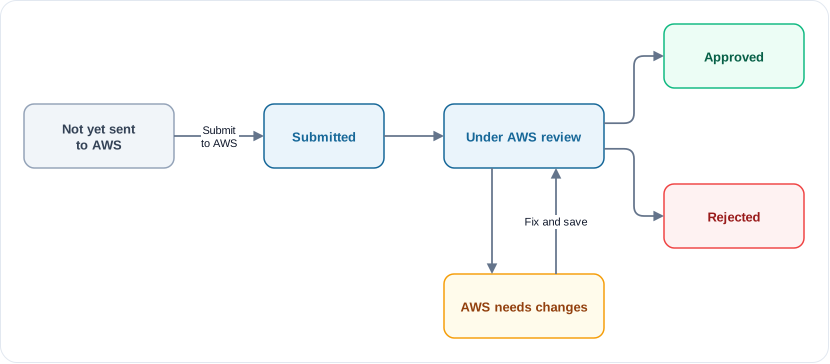
The FlowState card on the deal shows one status line. It tells you whether an opportunity exists and whether AWS has it for review. An opportunity can be linked (it exists in Partner Central) but not yet submitted (AWS has not started its review).
| Status line | What it means |
|---|---|
| Not yet sent to AWS | No opportunity exists for this deal. |
| Linked to AWS — not yet submitted for review | The opportunity exists in Partner Central, but nobody has submitted it. Click Submit to AWS on the Readiness tab. |
| Submitted — waiting for AWS review | FlowState submitted the opportunity. AWS has not started its review. |
| Under AWS review | AWS is reviewing the opportunity. You cannot change the business problem during the review. |
| AWS needs changes | AWS returned the opportunity. Read What AWS said on the card, fix the deal and save again. |
| Approved by AWS | AWS approved the opportunity. |
| Rejected by AWS | AWS rejected the opportunity. This is AWS’s final decision. |
When the opportunity has an AWS stage, the status line also shows it, for example Approved by AWS · Committed.
Opportunity lifecycle
An opportunity has two separate tracks: AWS’s review status and the stage of the opportunity. The stage follows your HubSpot deal stage, through your stage mapping.
The stage moves with the deal: Prospect, Qualified, Technical Validation, Business Validation, Committed, then Launched or Closed Lost. After AWS approves an opportunity, AWS accepts only a few more changes, such as the stage and the target close date.
Notes on the deal timeline
FlowState writes each APN result as a note on the deal, so the timeline shows whether a change reached AWS.
| Note | When FlowState writes it |
|---|---|
| Changes synced to AWS | After FlowState writes your edit to the opportunity. It lists each changed field. |
| Sync failed | When FlowState could not write a change. It gives the reason and the error code. The same failure is noted once, not on every retry. |
| Action needed | When a required field is empty. It names the fields to fill in. |
| AWS updated this opportunity and review or stage notes | When AWS submits, approves, rejects or moves the opportunity, or changes a watched field. |
The deal property APN Sync Status and the card show the same information.
Where to find APN in FlowState
| Place | What you do there |
|---|---|
| Settings → Integrations → APN | Connect or disconnect APN. Test the connection, show the connector values, and open the stage mapping. Set how the HubSpot Amount becomes the monthly spend that AWS gets. |
| Apps → APN → Overview | See how many deals are synced, pending, in conflict or failed. Push deals to AWS re-sends your linked deals. Pull updates from AWS reads every linked opportunity again. |
| Apps → APN → Match Deals | Pair opportunities that already exist in Partner Central with HubSpot deals. |
| Apps → APN → Conflicts | Resolve fields that both sides changed. |
| Apps → APN → Templates | Manage business-problem templates and default fields templates. |
| The FlowState card on each HubSpot deal | Prepare, submit and follow one opportunity. |
Sandbox and production
You choose a Partner Central catalog when you connect: Sandbox (for testing) or Production (your live co-sell pipeline). Start with Sandbox. See Sandbox vs production.
How your data is protected
You create an IAM role in your own AWS account. FlowState uses that role with a secret ExternalId that is unique to your tenant. FlowState does not store AWS keys, and it can do only what the role’s policy allows. See Trust policy.