Your pipeline, managed. Your AWS co-sell, automatic.
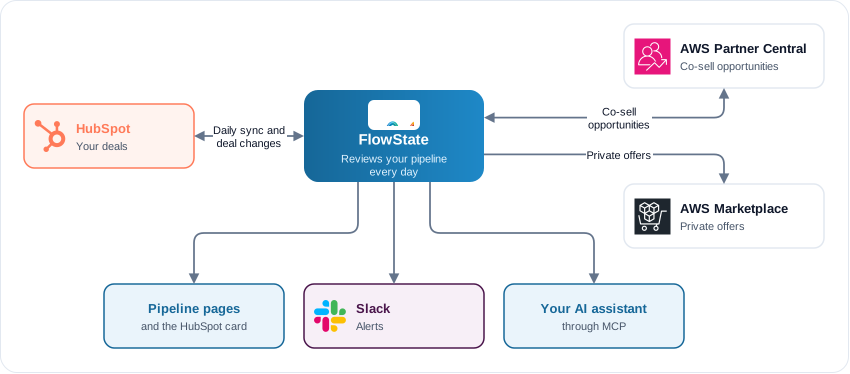
FlowState reviews your HubSpot pipeline every day and shows which deals need attention and why. For AWS Partners, it also keeps your HubSpot deals in sync with co-sell opportunities in AWS Partner Central, and builds AWS Marketplace private offers from the same deal.
A tenant is your team’s private workspace in FlowState. An organisation owns one or more tenants and pays for all of them. Every feature of a new tenant starts off.
Quick setup
Sign up
Click Get started on the FlowState homepage and create your account with email or Google. Signing up
Set up your organisation and first tenant
Choose how you pay, name your organisation and tenant, and complete the payment. Set up your organisation
Turn on features
Open Settings → Features and turn on HubSpot and AI agent. Nothing works until a feature is on. Turn on features
Connect HubSpot
Open Settings → Integrations → HubSpot and click Connect HubSpot. The first sync starts at once. Connect HubSpot
Add the card to your deals
A HubSpot admin adds the FlowState APN Sync card to a FlowState tab on the deal record. Show the FlowState card
Optional: Slack, APN and your team
Connect Slack for deal alerts. AWS Partners connect APN and AWS Marketplace. Then invite your team under Settings → Members.
The full walkthrough, with what you see after each step: Getting started.
Main tasks
What each pipeline page shows and how the daily analysis works.
Read your pipelinePrepare, submit and follow a deal with AWS from the FlowState card.
Work deals in HubSpotHow co-sell opportunities stay in step with your HubSpot deals.
Sync with AWS Partner CentralAWS Marketplace private offers from the deal you are working on.
Create private offersOverdue-deal alerts and a Monday digest, to owners or a channel.
Get deal alerts in SlackConnect Claude or another MCP client and ask about your deals in plain language.
Ask your AI assistantThe platform fee, usage prices and worked examples.
Plan and pricesWhich emails you get, and how to turn them off.
NotificationsTenant isolation, encryption, GDPR and sub-processors.
Security and compliance