APN conflicts and resolution
A conflict happens when you change a field on the HubSpot deal and AWS changes the same field on the opportunity to a different value, before the two sides are in sync again. This page explains when FlowState resolves it for you and how you resolve the rest.
Which fields can conflict
Only the three fields that both sides can change:
- Close date
- APN MRR (the expected monthly spend)
- APN Postal Code
Other fields cannot conflict. FlowState always takes HubSpot-owned fields from the deal and AWS-owned fields from AWS. See Field mapping.
How FlowState decides
FlowState remembers the last value that both sides agreed on, and compares each side with it.
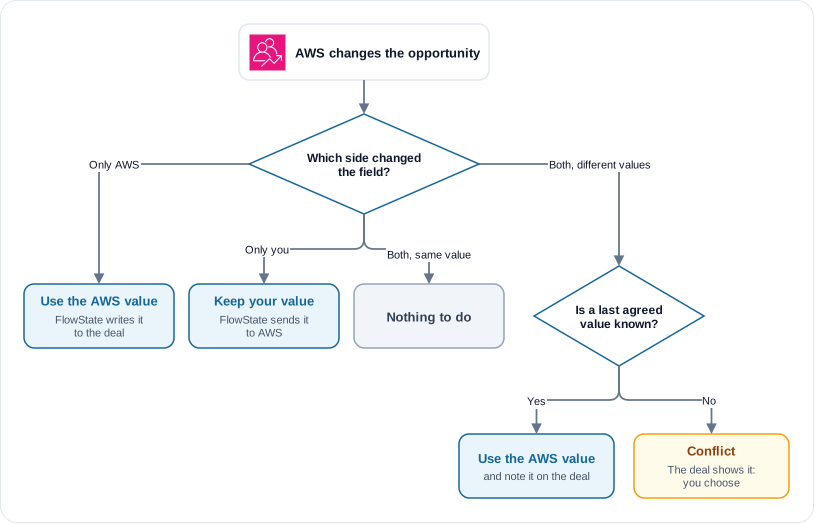
So AWS approving an opportunity while you change its close date does not cause a conflict: AWS did not change the close date.
When both sides changed a field and FlowState knows the last agreed value, it uses the AWS value. Partner Central is the reference once AWS has worked on the opportunity. The AWS updated this opportunity note on the deal shows the change.
When FlowState does not know the last agreed value (for example, the first time this field differs), it does not guess. The deal gets the APN Sync Status Conflict, and it shows on Apps → APN → Conflicts. FlowState keeps processing all other deals.
Resolve a conflict
- Go to Apps → APN → Conflicts. The page lists each deal in conflict, with the field, the HubSpot value and the APN value.
- For each deal, click Resolve from HubSpot or Resolve from APN.
- To resolve every listed deal the same way, click Resolve all from HubSpot or Resolve all from APN, then Confirm.
Result: the deal leaves the list, and the page shows Conflict resolved. When no conflicts are left, the page shows No conflicts.
What each choice does:
- Resolve from APN: FlowState writes the AWS value to the HubSpot deal at once.
- Resolve from HubSpot: FlowState sends the HubSpot value to AWS. While AWS reviews the opportunity (Submitted or In review), the value goes to AWS when the review ends.
After you resolve, FlowState also sends the other changes that you made to the deal while it was in conflict.
AWS locks APN MRR and APN Postal Code when it approves an opportunity. For an Approved opportunity, resolve these fields from APN. Resolve from HubSpot shows an error that names the locked field. Resolve all counts that deal as failed and resolves the others.
You need the tenant owner or admin role to resolve conflicts.
Over MCP
list_apn_conflictslists the deals in conflict, with both values for each field.resolve_apn_conflict_batch(deal_id, resolutions)resolves one deal.resolutionsmaps each field to"hubspot"or"apn", for example{"closedate": "apn"}.